Bambu LabA1 vs P2SWhich should you buy?
Both print a 256 mm cube. The A1 is the cheaper open printer for everyday plastics; the P2S is an enclosed printer that also handles ABS and ASA.
Quick verdict
Pick the A1for everyday plastics at a lower price.
Pick the P2Sfor enclosed printing with tougher plastics.
Which plastics each printer is made for
Both print the same 256 mm cube. The enclosure decides which plastics are practical.
The P2S has no chamber heater, which the most demanding engineering plastics need.12
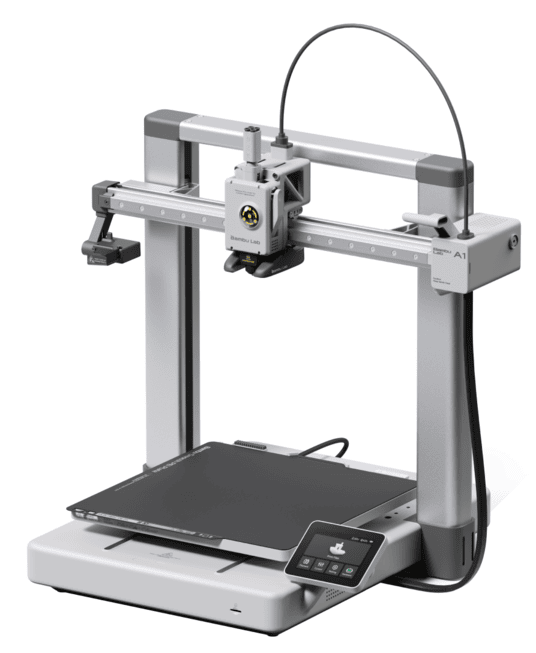
The easier place to start.
- Enclosure
- Open frame
- ABS and ASA
- Not recommended
- Bed heat
- up to 100 °C
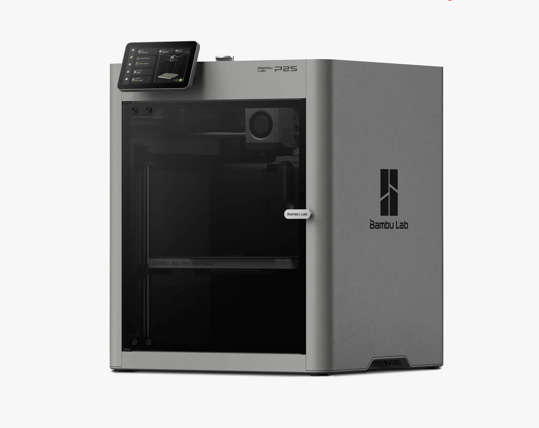
Closed and newer, for ABS and ASA.
- Enclosure
- Enclosed
- ABS and ASA
- With ventilation
- Bed heat
- up to 110 °C
Updated November 17, 2026 · Research-based comparison, not a hands-on side-by-side test. Our research method.
A1 vs P2S specs and prices side by side
This table compares the two, from price to the plastics each one handles well. Prices are US sale prices, next to the store’s usual price. What you pay at checkout may differ.
Prices (US, last checked)
| What you’re comparing | Bambu Lab A1 | Bambu Lab P2S | What it means for you |
|---|---|---|---|
| Printer alone | $259Typical $299 | $449Typical $549 | P2S costs $190 more on sale ($250 typical). The extra money buys an enclosure and a different design. The print size stays the same.34 |
| Combo (with spool changer)The A1 Combo adds the AMS Lite (four spools, multi-color prints); the P2S Combo adds the AMS 2 Pro, which also dries filament. | $359Typical $399 | $649Typical $749 | The Combos are $290 apart, but they include different feeders, and only AMS 2 Pro dries filament.342 |
Prices from Bambu’s US store on November 7, 2026, during its Black Friday sale. Tax and shipping not included. There’s also an A1 Combo Print with Care Bundle for $406 (listed value $449), left out here. Check the store before you buy.
Specifications
| What you’re comparing | Bambu Lab A1 | Bambu Lab P2S | What it means for you |
|---|---|---|---|
| Frame and enclosure | Open frame, bed moves back and forth | Enclosed CoreXY frame | The enclosure keeps drafts out for tougher plastics. It doesn’t automatically make PLA prints look better.12 |
| Hottest bed | 100°C | 110°C | P2S runs a slightly hotter bed. Whether a plastic prints well also depends on the air around it and your settings.12 |
| Automatic multicolor | AMS Lite, sold with the A1 Combo | AMS 2 Pro, sold with the P2S Combo | Each needs its own feeder for automatic color changes. Every change wastes a little plastic, and the feeder takes up space.12 |
| Camera | Up to 1080p, but a low frame rate | Smoother, higher frame rate, with timelapse | Handy for checking progress. A camera isn’t a fire detector, so it doesn’t make unattended printing safe.12 |
Same on both (4)Biggest print size · Hottest nozzle · Noise · Electricity use
| What you’re comparing | Both printers | What it means for you |
|---|---|---|
| Biggest print size | 256 × 256 × 256 mm | The largest single piece, about 10 inches on each side, is the same on both. How easily you can reach the plate still differs.12 |
| Hottest nozzle | 300°C | Same nozzle limit, but Bambu still recommends some plastics for only one of them.12 |
| Noise | No matched test | Owners of both disagree about fan and cutter noise, and nobody has measured both on the same print.5 |
| Electricity use | No matched test | Power use depends on the model, the plastic, bed heat and print time, so we haven’t guessed at savings.12 |
Specs are the maker’s ratings.
Which printer suits the things you want to make?
Start with the plastic you’ll use and the room the printer will live in. Price comes next.
The A1 is the better start if…
- Most of what you want to make is organizers, gifts, repair parts and everyday models in PLA or PETG, with no need for an enclosure.16
- Saving about $190 on the printer matters more to you than plastics you may never print. That’s the Black Friday sale gap, so check today’s prices.3
- You like reaching the plate and nozzle easily, and you’ll buy from Bambu’s own store so returns and warranty are simple.17
The P2S is worth the extra money if…
- ABS, ASA or other plastics that need an enclosure are on your list for real projects, beyond liking the look of a closed box.28
- You want the enclosed frame, the better camera and AMS 2 Pro enough to pay more. You’re also fine with some tuning and setting up ventilation.28
- You’ve read the safety notes for both and have a ventilated spot where the P2S can run.9102
What changes when you move from the A1 to the P2S
Each of these is a situation where picking the wrong printer gets expensive or annoying.
Tougher plastics cost more
Both print a 256 mm cube, but the P2S enclosure is what makes ABS, ASA and other heat-sensitive plastics practical. That only pays off if your designs need those plastics and your room can be ventilated. For common plastics, the A1 stays the simpler budget choice.128
A pricier frame won’t guarantee nicer PLA
One owner of both got noticeably better ironing (a smoothing pass on top surfaces) from the P2S on a PETG part. Another saw more visible marks on a P2S sample. An experienced owner had to tune the P2S settings a lot before results were consistent. The shape, filament, settings and room all play a part, so don’t buy the P2S for a better finish alone.111213
Each one has a different safety check
The A1 had an official cable recall in 2024, plus a separate power-board issue Bambu has acknowledged and says it fixed. P2S has serious owner reports of its own, with no confirmed cause. The safety section below explains both, and what to do.14910
What owners noticed after using both printers
Owners don’t always agree, and for good reasons: different plastics, rooms, settings and machines. Here’s what each person said in their own post.
After more than a year with an A1 Combo, this owner bought a P2S Combo and later sold the A1. What they valued was the enclosure and the wider choice of plastics. Everyday print quality, they said, was only slightly different. For them, the upgrade paid off because of the plastics.8
Read the A1 to P2S upgrade storyAn A1 owner with a dusty garage bought a P2S for the enclosure and to try ASA. They were disappointed at first but ended up satisfied. For prints that don’t need an enclosure, they still preferred how easy the A1 is, and found print quality similar. It’s one owner’s experience. Nobody ran a controlled test.6
Read the owners’ upgrade threadSomeone with an A1, an A1 Combo and a P2S said tall prints kept failing on the P2S. So they gave most of the work to the A1s. They thought about selling the P2S, but the thread doesn’t say they did.15
Read the P2S adhesion threadThis owner had run many prints on an A1 and a smaller first batch on a P2S. They found PETG ironing and top surfaces easier to get right on the P2S. They called it an informal comparison, since their test pieces weren’t identical and they’d only had the P2S a short time.11
Read the quick-notes comparisonThis writer, who runs two A1s, had repeated adhesion failures on a new P2S. They changed acceleration, cooling and flow, and added brims (thin borders that help a print stick). That fixed it, and the P2S became a dependable machine, though it took more effort to get there.13
Read the owner's P2S write-upOne owner found the P2S fans louder than the A1 in the same office. Another used a P2S while their A1 was out of action and found the extra noise acceptable. These are impressions by ear; nobody in the thread measured both.5
Read the noise threadSo what do these stories add up to?
The owners who needed tougher plastics were glad they moved to the P2S. For everyday PLA, several find the A1 easier and the prints about the same. A few hit early P2S tuning problems that settings later fixed. These are individual posts. They show what can happen, but not how often.
A1 vs P2S across nine buying questions
Each row below is one question buyers usually ask. Read across to see who comes out ahead and what that means for you. A draw means neither clearly wins that question, even where the hardware differs.
| The question | Edge | What it means |
|---|---|---|
| Who is it for? | Even | A1 is a practical first printer; P2S suits someone ready to use an enclosure. Both have a clear buyer. |
| Speed and setup | Even | Both print well and set up easily. P2S has a higher top speed on paper, but nobody has timed both on the same job. |
| Everyday hiccups | Even | Each has its own small hassles. The A1 needs room in front and behind for its sliding bed, so it’s harder to fit on a tight shelf. The P2S may need airflow, print-setting or AMS tweaks for some prints. |
| Price and value | A1 | Same print size for less money. When you don’t need tougher plastics, that’s the better deal. |
| Everyday projects | Even | Each does its own kind of job well: simple PLA work on one side, enclosed printing on the other. |
| What owners say | Even | Owners are happy with both, though the ones who own both disagree about surface finish and setup effort. |
| Problems and safety reports | P2S | P2S comes out a little better in our judgment of the documented issues. Nobody has measured a failure rate, and it isn’t trouble-free. A1 has a past recall and a power-board issue Bambu has acknowledged; P2S has serious owner reports of its own. |
| Running costs | Even | Costs are reasonable on both. Budget for the right feeder and spare parts, since the two Combos don’t include the same gear. |
| Software and extras | Even | Both use Bambu’s software and filament system. Day to day, the feeder, the enclosure and easy access matter more. |
These calls are our own judgment of how well each printer handles the jobs it’s made for. They aren’t lab results. Read the safety section before leaning on that row.
Living with the A1 or P2S day to day
If you print the same few things again and again, look at their shape and plastic as much as at the printer.
Will the P2S give me smoother prints than the A1?
Not on every shape and filament. In one owner’s PETG comparison, the P2S ironed that part more cleanly. Another owner preferred the A1 on flat surfaces and saw fine vertical marks on the P2S. How the part sits on the bed, the flow settings and the filament itself can explain the difference. Before paying for looks, compare your own settings on the same test print.1112
Is the A1 or P2S better for tall, thin parts?
In theory the P2S helps, because its bed doesn’t slide the print back and forth. Owners don’t all agree, though: some had tall P2S prints knocked over until they slowed acceleration and improved adhesion. If you make tall, narrow things, test the base size and brims on your own parts.15136
Is the P2S quiet enough to keep beside my desk?
Not necessarily. Some owners of both find the P2S fans or filament cutter more noticeable; others happily run it behind their office chair. Nobody has measured both on the same job and in the same room, so if you take calls or need quiet, plan for a separate, ventilated spot.5
Does the P2S enclosure make ABS and ASA safe to print indoors?
No. The enclosure keeps drafts away from the print, but it doesn’t remove the particles and gases from the room. Follow the maker’s guidance for each plastic and ventilate to the outside. The P2S also has no heated chamber, unlike printers built for the hottest plastics.162
A1 vs P2S cost: the printer is only part of it
The A1 is cheaper up front. A Combo name doesn’t mean the same accessories, though, and running costs depend on how you print.
A1: lower price and easy access
- In the Black Friday US sale, the A1 was $259 on its own and $359 with AMS Lite (usually $299 and $399). AMS Lite sits beside the printer, so it needs desk space. The $406 Print with Care Bundle is a separate package.34
- If you print in one color, you may not need a feeder at all. Frequent color changes waste some plastic on either printer, and how much depends on the object.12
- Bambu says it replaces affected A1 power boards whether or not you’re under warranty. Buy from Bambu’s own store, where US printers come with a two-year warranty and a 30-day return window, and read those terms before you order.97
P2S: enclosed printing and extra gear
- The same sale had the P2S at $449 alone and $649 with AMS 2 Pro (usually $549 and $749). AMS 2 Pro adds drying and works differently from AMS Lite, so the $290 Combo gap isn’t a like-for-like comparison.34
- The enclosure opens the door to ABS and ASA. Budget for ventilation, filament drying, calibration time and spare parts too.213
- We haven’t estimated yearly repairs, failure rates or electricity savings, because owners’ setups and print hours vary too much.65
All prices are US sale prices, with the store’s usual price beside them. Independent trackers show the same prices, but we didn’t check tax, shipping or the final checkout total.
Which printer fits each kind of project
Find the row that sounds most like you.
| If you’re printing… | Best fit | Here’s why |
|---|---|---|
| Your first PLA gifts, organizers and spare parts | A1 | Both can make these. The A1 costs less and keeps everything easy to reach.31 |
| ABS or ASA cases and outdoor parts | P2S, with ventilation | The enclosure makes these plastics practical, and A1’s own guidance doesn’t recommend them. Ventilate the room either way.12 |
| Tall, narrow display models | Test both; P2S has a slight edge | The P2S bed doesn’t slide the print around, but some owners still lost tall prints until they tuned their settings.1513 |
| Small multicolor gifts and signs | Compare the full Combos | AMS Lite and AMS 2 Pro are different feeders. Choose by whether you need drying and how often you’ll print in color.32 |
| A desk next to someone working from home | Neither is especially quiet | Owners disagree about P2S fan and cutter noise, and there’s no matched measurement. Plan for distance or a separate room.5 |
| Projects with an older child, with an adult present | A1, with supervision | The open A1 makes the process easy to watch, but its hot and moving parts are within reach. Keep either printer in a spot you control.12 |
| Simple prints to sell as a side business | A1 to start; P2S if your jobs need it | Count filament, upkeep and downtime. If speed matters, time a few typical jobs before you spend more.3613 |
| Electrical housings or safety-critical load-bearing parts | Neither; buy certified parts | A home 3D print isn’t a certified electrical or safety part, whichever printer made it.12 |
| Plastics that need a heated chamber | Neither is the right first choice | P2S is enclosed but has no chamber heater, and A1 is open. Look for a printer rated for that specific plastic.21 |
A1 and P2S safety: recalls, reports and what to check
What’s on record for each printer, how strong the evidence is and what to do about it.
- A1: a 2024 recall of early units (check your serial)
- In June 2024 the U.S. CPSC recalled about 12,800 A1 printers sold between December 2023 and January 2024, because a damaged heatbed cable could short or spark. There were 19 reports of damaged cables, one of them sparking, and no injuries. The recall covered that sales window, so it doesn’t mean new printers are affected. If you’re buying older or used stock, check the serial number on the QR sticker at the back. Recalled units have an “A” as the sixth character. If a printer is covered, stop using it and get the official refund or replacement instead of repairing it yourself.1417
- A1: a power-board issue Bambu has acknowledged
- Some A1 printers built with the original power board had overheating parts. In January 2026, Bambu said a redesigned board fixed this from the third quarter of 2025. It estimated the rate at about 0.052%, based on support reports across its A1, X1 and P1 printers, so that isn’t a figure for the A1 alone. Bambu replaces the board whether or not you’re under warranty, and says no fires have been linked to this issue. It hasn’t said how to tell which board a given unit has. Never open the printer’s power electronics yourself. Separately, our A1 guide lists other single owner reports, including fires, a shock and burning smells, none with a confirmed cause.9
- P2S: individual owner reports
- One P2S owner found charred internal wiring and a melted protective part after an ABS print. They later updated the post to say support had offered a replacement or refund. The cause wasn’t confirmed, and when we checked the CPSC database on November 8, 2026, there was no P2S recall. Our P2S guide covers a second report of melting around the hotend, plus control-board and extruder-motor failures, some fixed under warranty. If any printer smokes, runs unusually hot or smells electrical, stop using it and have it checked.10
No source compares incident rates across printer brands, so these reports can’t show which printer is safer overall. Full details: A1 safety section · P2S safety section.
What the research points to: A1 or P2S?
A1 wins on value, P2S edges ahead in our reading of the documented safety issues, and the other seven questions are a draw. Nobody has measured failure rates for either, so the right choice depends on what you’ll print, not on a score.
Mostly PLA and PETG? The A1 gives you the same print size for less money. Buy it from Bambu’s own store so returns and warranty are simple. Need ABS or ASA, an enclosure and AMS 2 Pro? Then the extra money for the P2S has a clear purpose.3127
Don’t count on a smoother finish or a quieter room from the P2S. Owners of both disagree about PETG ironing, everyday PLA results, noise and how much tuning the P2S needed. None of that rules out either printer.61112513
Not sure yet? Write down the first five things you want to print. If most are PLA or PETG, start with the A1. If several need ABS, ASA or an enclosure, the P2S is likely worth the extra money.12
Paying more doesn’t buy you a risk-free printer. Whichever you choose, read the safety notes, plan a ventilated, safe spot and check the store’s return and warranty terms before you pay.14910
A1 vs P2S: ten common questions answered
The follow-up questions buyers ask most often.
Is the A1 or the P2S better for a beginner?
The A1, for most people starting with PLA or PETG. It costs less, and the open design makes the bed and nozzle easy to reach while you learn. Start with the P2S only if you already know you need its enclosure for ABS or ASA.312
Can the P2S print bigger objects than the A1?
No. Both list a 256 × 256 × 256 mm build volume. The enclosure and motion system change how the P2S works. The largest size it can print stays the same.12
Can I buy the A1 Combo now and use the P2S Combo’s feeder later?
Don’t count on it. AMS Lite and AMS 2 Pro aren’t simply interchangeable. Check the maker’s product page for compatibility and any adapter or hub you’d need before buying for multicolor or drying.2
Is the P2S worth it if I only print flexible TPU?
Probably not. Bambu lists TPU as a suitable plastic for the A1, and the feed path and the TPU grade matter more than a closed box. Check the maker’s spool and feeder guidance for your exact filament.12
Does the P2S have a heated chamber for engineering plastics?
No. The P2S has an enclosure and airflow control, but no chamber heater. Check what chamber temperature your plastic needs as well as the nozzle limit.2
If a used A1 got the 2024 recall fix, does that cover the power-board issue too?
Not automatically. The 2024 recall was about the moving heatbed cable; the later issue involves parts on the internal power board. When buying older stock or a used A1, ask the seller about both.149
Is the $359 A1 Combo the same deal as the $649 P2S Combo?
No. In the Black Friday sale the A1 Combo came with AMS Lite for $359 (usually $399). The P2S Combo came with AMS 2 Pro for $649 (usually $749). Compare them by the plastics and drying you need, and check the final checkout total.32
Do owner trouble reports prove the P2S fails more often?
No. Owner posts show what happened in particular homes; comparing failure rates would need many printers, long use and confirmed causes. The same posts also include P2S printers that became reliable after a few setting changes.1310
Should I replace the A1 I already own with a P2S?
Only if you need something the A1 can’t do. One owner sold their A1 after moving to the P2S for its wider choice of plastics. Others who own both see very similar results on everyday prints.861112
Is the A1 or the P2S easier to deal with when a print fails?
Sooner or later a first layer won’t stick or the nozzle will need cleaning. The open A1 lets you reach those parts quickly. The P2S handles more plastics, but it still needs the same cleaning and the occasional fix.1213
Where the specs, safety facts and owner stories came from
Specs come from Bambu’s own documents and the CPSC, prices from independent trackers, and the day-to-day details from owners in their own words. Each small number in the article links to the source behind it.
Our method
How we compared these printers
We built this from Bambu’s own specs, Bambu’s US store prices, independent reviews and owner reports. We did not test the two printers side by side. Prices come from Bambu’s US store and leave out tax and shipping. Store links go straight to Bambu’s store, with no affiliate code and no commission.
- Bambu Lab A1 — manufacturer technical specifications— Bambu LabBambu’s A1 specs: build size, suitable filaments, motion system, camera and electrical ratings.
- The Icon Redefined: meet the P2S— Bambu LabBambu’s P2S launch: build volume, enclosure, nozzle and bed limits, AMS 2 Pro and the camera.
- Bambu Lab US-store printer prices — November 7, 2026 tracker— PrinterDropsUS prices for the A1, A1 Combo, P2S and P2S Combo on November 7, 2026; checkout totals not checked.
- Bambu Lab Black Friday 2026 — advertised and Typical Price by configuration— Anton Månsson — independent promotional price roundupAn independent cross-check of the sale and usual prices for both printers and both Combos.
- How loud actually is the P2S vs A1?— Reddit / r/BambuLabP2SOwners of both printers compare fan and cutter noise by ear; no lab measurements.
- For people who have both the A1 and P2S: is the upgrade worth it?— Reddit / r/BambuLabP2SOwners of both printers share opposite experiences; a self-selected group, not a controlled sample.
- New 30-day return window and two-year warranty announcement— Bambu Lab forum, Aug. 17, 2026Bambu’s announcement of two-year warranty coverage for US and Canadian printers and a 30-day return window for store purchases.
- A1 to P2S upgrade— Reddit / r/BambuLabP2SAn A1 owner moves to a P2S, later sells the A1 and explains why the enclosure mattered.
- Bambu Lab Clarifies Situation Amid Reports of Partially Melting A1 3D Printers— All3DPAll3DP’s January 2026 report with Bambu’s response on the A1 power board: the Q3 2025 redesign, the 0.052% figure and free replacement boards.
- Bambulab P2S PSU burned up and Bambulab refusing a refund — owner update— Reddit / r/BambuLabA P2S owner’s report of damaged internal wiring after an ABS print, later followed by a replacement or refund offer; cause unconfirmed.
- P2S quality versus A1: quick notes— Reddit / r/BambuLabAn owner of both compares PETG ironing; the test pieces weren’t identical.
- P2S vs A1 — owner surface-finish comparison— Reddit / r/BambuLabP2SAn owner who preferred the A1 on one model, noting filament and orientation differences.
- The Bambu Lab P2S: a painful journey— Nicolò AndronioThe owner of two A1s adds a P2S, struggles at first and fixes it with setting changes.
- Bambu Lab Recalls A1 3D Printers Due to Electric Shock and Fire Hazards— U.S. Consumer Product Safety CommissionThe official June 13, 2024 CPSC recall: which A1 units, how to check the serial number and the remedy.
- Nothing sticks on ANY plate on the P2S. I’m going insane! — page 3— Bambu Lab Community ForumAn owner shifts everyday printing back to the A1 and considers selling the P2S; no sale confirmed.
- NIOSH — Approaches to Safe 3D Printing (publication 2024-103)— U.S. National Institute for Occupational Safety and Health (NIOSH)NIOSH guidance on safer 3D printing and controlling emissions indoors.
- A1 Recall Update — February 4, 2024— Bambu LabBambu’s own notice on the 2024 heatbed-cable recall, separate from the later power-board reports.