Bambu LabA1 vs P1SWhich should you buy?
Both print a 256 mm cube. The A1 is the cheaper open printer for PLA and PETG; the P1S is a closed box that also handles ABS and ASA.
Quick verdict
Pick the A1for everyday plastics at a lower price.
Pick the P1Sif you need a closed printer for tougher plastics.
Which plastics each printer is made for
Both print the same 256 mm cube. The closed box is what changes the list.123
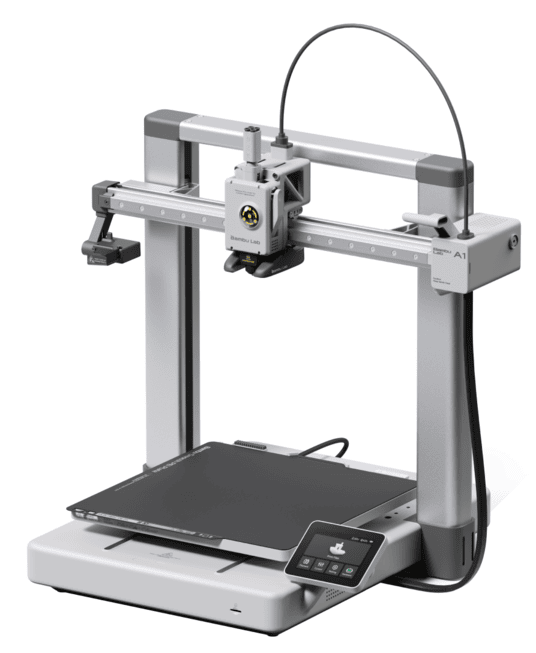
The easier place to start.
- Enclosure
- Open frame
- ABS and ASA
- Not recommended
- Screen
- 3.5-in touchscreen
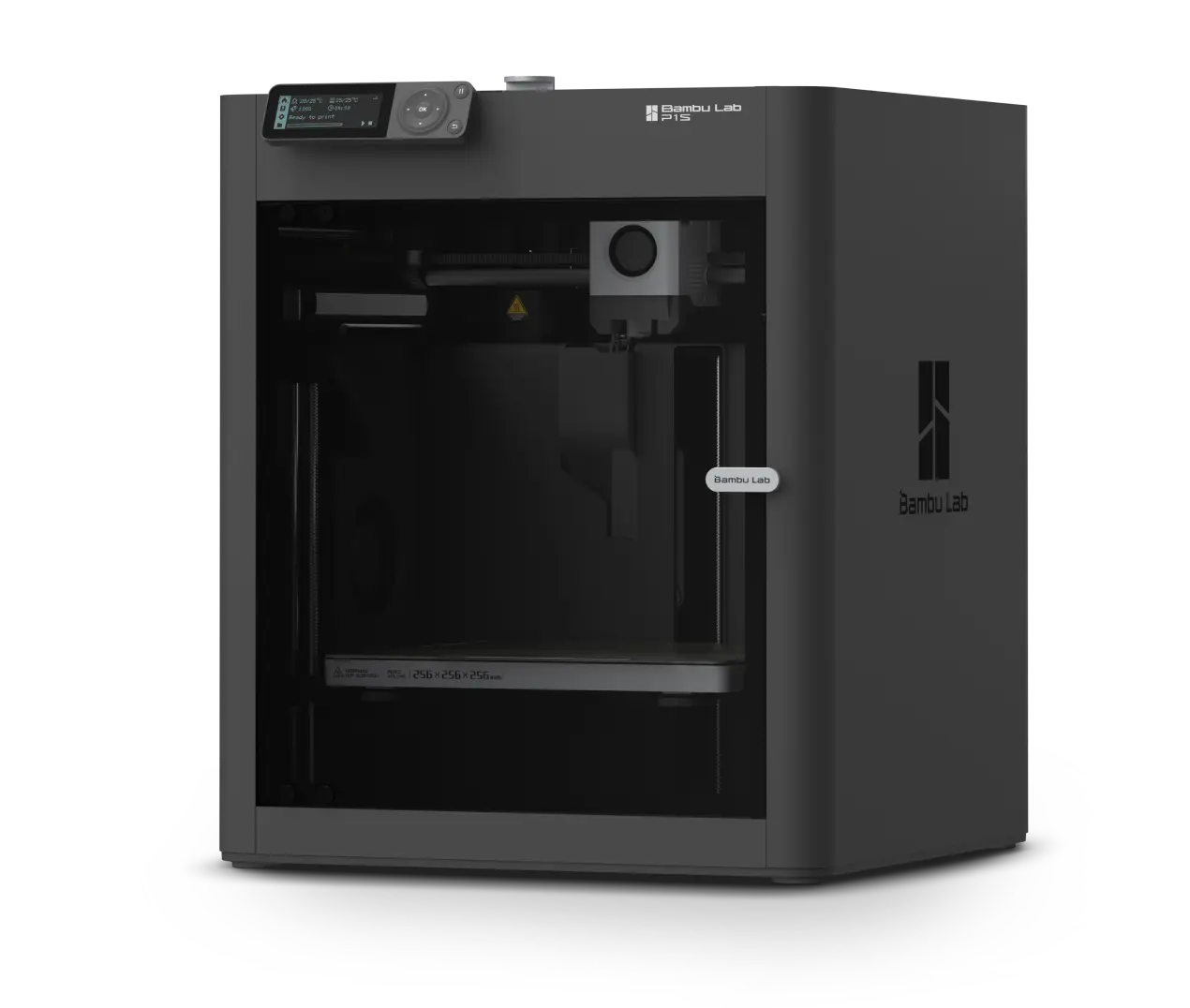
Closed, for ABS and ASA too.
- Enclosure
- Enclosed
- ABS and ASA
- Recommended
- Screen
- 2.7-in, buttons
Updated November 17, 2026 · Research-based comparison, not a hands-on side-by-side test. Our research method.
A1 or P1S? Here’s where the extra money goes
The price gap is easy to see. The harder question is what you get back for it. Here are the useful numbers from Bambu’s specifications and its US Store prices.
Prices (US, last checked)
| What to compare | Bambu Lab A1 | Bambu Lab P1S | What it means at home |
|---|---|---|---|
| Printer alone | $259Typical $299 | $349Typical $399 | The P1S is $90 more on sale, or $100 more at typical prices.45 |
| Combo (with spool changer)Each Combo adds Bambu’s automatic spool changer for multi-color prints: AMS Lite with the A1, the original AMS with the P1S. | $359Typical $399 | $479Typical $549 | $120 apart on sale ($150 typical). The two feeders differ, so the Combos aren’t like-for-like.45 |
Prices from Bambu’s US store on November 8, 2026, during its Black Friday sale. Tax and shipping not included. A $509 P1S bundle with the newer AMS 2 Pro and a $406 A1 Combo Print with Care Bundle also exist; they hold different extras. Check the store before you buy.
Specifications
| What to compare | Bambu Lab A1 | Bambu Lab P1S | What it means at home |
|---|---|---|---|
| Maximum acceleration | 10,000 mm/s² | 20,000 mm/s² | P1S gets up to speed more quickly, which helps when the nozzle makes lots of short moves.13 |
| Bambu’s short PLA test | about 16 min 58 s | about 16 min 8 s | On that particular test print, P1S was about 50 seconds quicker.6 |
| Average power in that PLA test | roughly 95 W | roughly 105 W | The difference is small. Filament and wasted prints are more likely to affect your running costs.6 |
| Noise figures | ≤48 dB (Bambu’s silent-mode claim) | below 55 dB in a separate print-job test | Different test conditions. Don’t treat these two readings as a direct head-to-head result.27 |
| Body size and working clearance | Bambu’s documents disagree on overall width: 385 × 410 × 430 mm (technical sheet) or 465 × 410 × 430 mm (quick-start guide). The bed needs space to move. | 389 × 389 × 458 mm; the frame stays in place | For A1, Bambu’s AMS lite setup guide calls for 198 mm clear behind and 90 mm in front. Measure the whole area the bed moves through, as well as the printer itself.81910 |
| Camera | up to 1080p, but with a low frame rate | 1280 × 720 at 0.5 fps (one frame every two seconds) | Useful for a quick check on a print. Neither is a smooth live-video camera.1311 |
| How the printer moves | Open design; the print bed moves forward and back | Enclosed CoreXY design; the bed mainly moves up and down | A1 leaves the print head in easy reach. P1S keeps most movement inside its frame.111 |
| On-printer controls | 3.5-inch touchscreen | 2.7-inch button-operated screen | If you change settings at the printer rather than in an app, A1 is more convenient.19 |
| Automatic multicolor option | AMS lite (Bambu’s automatic spool changer) with A1 Combo; up to 4 colors | AMS family with P1S Combo; up to 16 colors with four AMS units | P1S has more room to grow. Owners of both report quicker, more dependable color changes on the A1’s AMS lite. Standard models use one spool.2712131445 |
Same on both (3)Space available for a print · Fastest listed toolhead speed · Nozzle and bed temperature limits
| What to compare | Both printers | What it means at home |
|---|---|---|
| Space available for a print | 256 × 256 × 256 mm | Same advertised print area. Neither gives you more room for a large model.13 |
| Fastest listed toolhead speed | 500 mm/s | Identical headline figures. Your actual print time depends on more than this number.13 |
| Nozzle and bed temperature limits | 300°C / 100°C | The temperatures match, but A1 still isn’t recommended for ABS or ASA.13 |
The A1 width discrepancy comes from two official Bambu documents. Third-party measurements aren’t the cause. Its technical sheet says 385 mm and a quick-start guide says 465 mm, and neither covers the full space the printer needs while working. Check Bambu’s front/back spacing diagram before choosing a shallow shelf.8110
Start with the projects you’ll make
You want an uncomplicated first printer
- Most of your designs will be printed in PLA, PETG, or TPU.
- You’d like a touchscreen and room to reach the nozzle when a print goes wrong.
- The printer will live in a home office or another shared space where noise matters.
- You don’t have plans for filaments that need an enclosure.
- You’d rather put the $90 base-price saving toward filament and spare parts.
You have a reason to go enclosed
- ABS or ASA is a definite part of your plans.
- Your shelf or workbench suits a printer whose bed only moves up and down better than one whose bed slides forward and back.
- You regularly make tall functional pieces that can benefit from that motion setup.
- You prefer the printing mechanism to sit inside an enclosure.
- You don’t mind reaching into the machine for some maintenance jobs.
Four things that feel different in everyday use
You can compare speed figures all afternoon, but your filament and workspace usually settle this choice much faster.
Planning to print ABS or ASA?
This is the P1S’s strongest argument. An enclosure keeps warm air around the print, which stops those plastics from warping and cracking. Bambu specifically advises against using them on the open A1.13
Does twice the acceleration mean twice the speed?
No. Both advertise 500 mm/s at the print head. P1S has the higher acceleration, but it was only about 50 seconds ahead in Bambu’s short PLA test.163
Will you change nozzles often, or squeeze the printer onto a shelf?
On A1, you can reach the toolhead without opening a cabinet. P1S trades that convenience for a fixed, enclosed frame that takes up a more predictable footprint.19311
Can you see a difference in ordinary PLA prints?
A shop owner printing with both machines didn’t notice an obvious difference on comparable PLA pieces. If that’s most of what you make, pay more for the enclosure. Don’t expect prettier parts from it.1516
What changes once the printer is on your desk?
A spec sheet can’t tell you how much you’ll enjoy changing a nozzle or clearing a jam. These accounts offer a look at daily life with the two printers, including a few different opinions.
With ordinary PLA jobs side by side, one shop owner couldn’t see much difference in the finished surface. The type of work and the shop’s layout mattered more.15
Read the print-shop discussionThe wider choice of materials was welcome. So was the enclosure. But this owner found the P1S louder and missed how easy A1 felt to operate.17
Read about the switch to P1SFor this person’s workload, the two machines could do much the same jobs. A1 won them over because it was easier to reach and maintain.18
Read why A1 won them overA1 became this owner’s daily pick. P1S still had a place when a job called for an enclosure.14
See the PLA-focused discussionNot everyone misses A1. One upgrader liked the enclosed design and AMS arrangement, and thought their prints looked a little better too.19
Read the positive P1S experienceThis shopper was drawn to an enclosed printer whose bed only moves up and down. They weren’t arguing that A1 made bad prints.20
See the shopper’s reasoningHow much weight should you give owner reports?
Behind this guide are our full A1 and P1S assessments, built from 827 owner discussions. We also read 23 linked discussions comparing the two directly and one outside hands-on comparison. The six stories are paraphrased rather than quoted. They help explain day-to-day ownership, but they can’t show how often a printer fails.
A quick guide to the sources: Use Bambu’s documents for the specifications, the U.S. Consumer Product Safety Commission (CPSC) notice for recall details, and owner discussions for lived experience. The nine-part comparison below is our editorial judgment, and it isn’t based on lab measurements.
Nine buying questions, with two points in A1’s favor
For typical PLA/PETG use, A1 earns two everyday advantages. The other seven questions are ties or choices that depend on your projects; the middle column shows what tips each one.
| The question | Practical result | What to take from it |
|---|---|---|
| Which one is right for my projects? | Match the material | PLA household prints and enclosed-material jobs don’t call for the same printer. |
| Getting started and using it | A1 advantage | P1S accelerates harder, but A1 is easier to operate at the printer and more open for routine maintenance. |
| What problems might I run into? | Maintenance varies | Either can have jams, poor first layers, or other headaches; the jobs and upkeep make a difference. |
| What’s it like to own long-term? | A1 advantage | If PLA and PETG cover your needs, A1’s lower price and easier access are hard to overlook. |
| Which is better for my specific parts? | Match the part | For a PLA organizer, A1 is plenty. For a part that needs ABS or ASA, look at P1S. |
| What do owners prefer? | Preference varies | Some value A1’s simplicity; others wouldn’t give up P1S’s enclosure. |
| Which is more reliable? | No proven leader | There isn’t a sound head-to-head failure-rate figure for these two printers. |
| What will I spend over time? | A1 to save · P1S for enclosure | A1 is cheaper to buy. P1S can save frustration on jobs that need enclosed printing. |
| Software and accessories | Shared ecosystem | Both share the Bambu software ecosystem, along with many of its conveniences and restrictions. |
These are buying judgments rather than lab scores. A1 comes out ahead twice for regular PLA and PETG use, and the other seven depend on what you print. If you plan frequent ABS or ASA projects, choose P1S.
What matters once the printer is yours
Would my PLA prints look any better on P1S?
Probably not enough to justify the price on appearance alone. A print-shop owner who used both couldn’t pick out a clear visual winner on comparable PLA parts. Other people who own both have described similar results.1516
There are exceptions. Tall shapes and filaments that print better inside an enclosure can tip the balance toward P1S. A basic PLA organizer usually won’t ask for those strengths.
Will I save much time with P1S?
P1S reaches speed faster, which may help with models full of short movements. On straightforward jobs, the difference can be modest; Bambu’s short PLA comparison above is a good example. Your filament and print settings still matter.163
Could I keep one next to my work desk?
Think about noise before choosing a spot. Bambu quotes ≤48 dB for A1 in silent mode; a separate P1S print test recorded under 55 dB. Those measurements were taken differently, so they aren’t a fair side-by-side score. Some owners who’ve tried both find P1S more noticeable while it’s running.2717
How much room should I leave around it?
Measure the space the printer needs while it’s working, since that’s more than the box it sits in. P1S measures 389 × 389 × 458 mm and moves the bed vertically inside its frame. The A1’s bed travels forward and back. Bambu’s own A1 documents list two body widths, 385 mm in a technical sheet and 465 mm in a quick-start guide. For a tight shelf, its newer A1 Combo setup instructions are more useful. They ask for 198 mm at the rear and 90 mm at the front so the bed can move safely. Make room for the spool or AMS lite too.98110
Will one add much more to my power bill?
In Bambu’s short PLA test, A1 used about 95 W on average, against about 105 W for P1S. That gap is unlikely to decide the purchase. Wasted filament and prints that need redoing can cost more.6
Are the screen and camera any good?
A1 has a 3.5-inch touchscreen; P1S has a smaller, button-operated screen. You’ll feel that difference if you like changing settings at the machine. Neither camera is made for smooth video; both are for checking progress. A1 goes up to 1080p at a low frame rate, and P1S lists 1280 × 720 at 0.5 fps. If you run most jobs from Bambu Studio (the desktop software) or the Bambu Handy phone app, the screen matters less.1311
What about recalls and long-term reliability?
For a used A1, start with the official 2024 heatbed-cable recall and check its serial number before powering it on. Reports also describe older A1 power-board issues and isolated P1S electrical or glass-door incidents. The safety section below separates the official recall from individual owner accounts and explains what to check.21222324
Which one makes more sense as a first printer?
For a beginner making things in PLA, PETG, or TPU, A1 is easy to recommend. It costs less upfront, has a helpful touchscreen and gives you no enclosure to work around. If your very first project calls for ABS or ASA, though, the P1S is a perfectly sensible place to begin.
What about small mechanical parts and architectural details?
Both offer the same advertised build space and options for smaller nozzles. For detailed PLA clips, brackets, and architectural parts, A1 leaves more room in the budget for good filament and the right nozzle. P1S makes more sense if you also plan to print materials that benefit from an enclosure.
Which is less annoying when something clogs?
On A1, the toolhead is out in the open and the hotend (the heated nozzle assembly) is designed for quick swaps. With P1S, you’re reaching into the enclosure. Either machine can still get a blocked nozzle, tangled filament or a first layer that won’t stick. A1 simply gives you more elbow room when you sort things out.1518
Can I print anything if the nozzle reaches 300°C?
No. Temperature is only part of the story. Both have an all-metal hotend rated to 300°C. P1S’s enclosure is the important difference for ABS and ASA; Bambu doesn’t recommend them on A1. If you’re considering carbon- or glass-filled filament, check that your exact nozzle and extruder (the part that feeds the filament) are suitable before buying.13
The sticker price is only part of the bill
You’ll buy filament, maybe add multicolor hardware and eventually replace a part or two. Here’s where the cost difference matters, and where it probably doesn’t.
Upfront cost, filament, and wear
- At checkout: The US Store listed A1 at $259 (typical $299) and P1S at $349 (typical $399) in its Black Friday sale. The nearest multicolor Combos were $359 and $479. Keep extra bundles out of the base-price comparison.
- Electricity: Bambu measured about 95 W for A1 and 105 W for P1S in its short PLA test. There’s little reason to make this your deciding factor.6
- Filament and spare parts: Failed jobs use up plastic. Multicolor prints also waste some filament during color changes. Add nozzles, other replacement parts (Bambu’s store lists A1 hotends from $9.99), and the time a job takes.25
- What makes the premium worthwhile: If enclosed ABS/ASA printing is part of your routine, P1S can justify the expense. For a stream of PLA work, A1 generally leaves more money in your pocket.
Multicolor printing and day-to-day controls
- Multicolor costs extra: A1 uses AMS lite; P1S works with compatible AMS-family hardware. Don’t assume every Combo includes the same unit.
- Using the machine: A1’s touchscreen and open toolhead are handy when you’re standing next to it. P1S uses buttons. Both work with Bambu Studio and Bambu Handy.
- Make space for the extras: Automatic color changes take time and create purge waste (plastic flushed out at each color change). The AMS and spools need room on your desk or shelf too.
- Want full open-source control? If you need unrestricted firmware and hardware changes, neither is an obvious choice. Bambu’s 2025 authorization update limited outside software, such as third-party apps, on both. Each can still print from a microSD card or over your home network in LAN mode, but you give up the app’s remote features.26
Is P1S too old to buy in 2026?
Its screen and camera are dated next to newer machines such as the enclosed P2S, which was $449 in the same sale (typically $549).27 Even so, Bambu said in February 2026 that it intended to keep making and selling P1S. Bambu discontinued the P1P, the cheaper open-sided version. The P1S stays on sale. Before passing on P1S, compare its current price with the features and filaments you need.28
Your real running costs will also depend on local electricity prices, how much filament you use, and how often you need repairs.
What do you want to make with it?
A shelf of PLA gifts, a run of products for customers, and an ASA bracket for outside aren’t the same job. Find the row that sounds like yours.
| If you’re making… | Start by looking at | Here’s why |
|---|---|---|
| Your first gifts, organizers, or household fixes | A1 | Easy controls, a toolhead you can reach, and a lower purchase price. You don’t give up any listed build volume. |
| Projects with kids at home | Either, with an adult in charge | Families print toys and learning projects on both. Stick to PLA, ventilate the room, and remember the A1’s hot nozzle is out in the open. |
| RC car and drone parts | A1 | It handles the TPU and PETG most mounts and guards use, and owners print camera mounts on it. P1S can too, but its record here is thinner. |
| Lots of PLA/PETG parts for a small shop | A1 for value | A sensible starting point for repeat jobs. Leave room in your budget for spares and occasional failed prints. |
| ABS/ASA parts or heat-sensitive prototypes | P1S | These filaments benefit from an enclosure. You’ll still need ventilation suitable for the material. |
| Tall, thin parts that wobble on a moving bed | P1S; check the model | Its bed only moves up and down, which may help. The part’s shape and the print settings still count. |
| Prints in a room where you work | A1, with a suitable setup | Some owners of both find it less distracting. Neither machine is silent, and a shared room still needs proper ventilation. |
| Projects in a supervised classroom | Depends on supervision | A1 is easier to demonstrate and reach; P1S encloses the moving parts. Adult oversight and good ventilation matter with either. |
| Multicolor signs or architectural models | Check the Combo first | Compare A1 plus AMS lite with the specific P1S AMS package. Nozzle choice, purge waste, and available space all matter. |
| Enclosed prints with a newer screen | Compare P2S too | P1S might still win on price, but check what you gain or lose with a newer enclosed model. |
| Printing without the cloud | Either, with limits | Both print from a microSD card or over your home network in LAN mode; you lose the phone app’s remote features. |
| A fully open firmware platform or certified industrial setup | Look beyond both | Those are specialized requirements. Start a separate shortlist rather than treating either consumer machine as a match. |
Before you pay, ask: Am I going to print ABS or ASA regularly? Will a fixed, enclosed frame help with my parts or my space? Can I explain what I’d use the P1S’s extra features for? If your answer is no across the board, the A1 is probably all you need for everyday PLA and PETG.
What’s documented, and how much weight it carries
Here’s what’s documented for each printer and how strong the evidence is. The full details live in our A1 and P1S guides.
- A1: a 2024 recall of early units (check your serial)
- The U.S. CPSC recalled about 12,800 A1 printers on June 13, 2024 over a heatbed cable, listing 19 damaged-cable reports, one with sparks, and no injuries. Affected serial numbers have “A” as their sixth character. If a machine is covered, stop using it and arrange the official remedy rather than repairing it yourself.21
- A1: a power-board issue Bambu has acknowledged
- Some A1 printers built with the original power board had heat-damaged components. Bambu says the design was fixed in the third quarter of 2025. It estimates the rate at about 0.052% from support reports across its A1, X1 and P1 printers (not an A1-only figure). It replaces the board whether or not you’re under warranty. It hasn’t said how to tell which board a given unit has.22
- P1S: individual owner reports
- One owner noticed smoke and a burning-electronics smell from an idle printer after a long print. Others said the glass door shattered while the printer was idle, in one case hurting children. These are individual accounts with no confirmed cause, and there has been no recall. Our P1S guide also covers two reports of an electrical fire or a burning component.232429
- For either printer
- Ventilate the room, especially for ABS and ASA; the P1S enclosure and carbon filter don’t replace that. If a printer smells burnt or starts smoking, stop the job, disconnect power if it’s safe to do so, and contact the maker before using it again.3
If your A1 is covered by the recall, stop using it. Follow the official instructions rather than attempting a repair. Read the official U.S. CPSC recall notice
An official recall, an issue the maker has acknowledged and individual owner reports carry different weight. No source compares incident rates across printer brands, so none of this ranks the A1 against the P1S. Full details: A1 safety section · P1S safety section.
What the research points to: A1 or P1S?
For PLA, PETG, and TPU projects around the house or in a first workshop, A1 is the easier buy. It costs less, the controls are simple and everything is easy to reach when maintenance comes around. P1S earns the extra money when you need an enclosure or its fixed frame, where the bed only moves up and down, for the parts you make.
You get the same advertised build space either way. And owners who use both don’t always see a visible difference in basic PLA prints. If the P1S’s extras won’t change what you print, put the savings toward filament instead.
A few last questions about A1 and P1S
Is P1S a straight upgrade over A1?
Only for the jobs that use its extra features. P1S brings an enclosure, a bed that only moves up and down, and more filament options. A1 is cheaper, easier to reach, and nicer to operate at the screen.
What does the extra P1S money buy?
Mainly an enclosure, a fixed frame and more plastics. On the P1S the bed only moves up and down. Using the Black Friday US Store listings, the base printers are $90 apart and the nearest multicolor Combos $120 apart. The typical base prices differed by $100.
Is P1S twice as fast?
No. The P1S accelerates faster, but both list the same 500 mm/s maximum toolhead speed. The time saved depends on the part you print.
Which will bother me less with noise?
A1 may bother you less beside a desk. Bambu quotes ≤48 dB for A1 in silent mode; a separate P1S test recorded under 55 dB. Because those aren’t matched tests, your setup will matter more than subtracting the figures.
Will PLA pieces look better from a P1S?
Don’t count on a visible upgrade for everyday prints. Some owners of both saw little difference with PLA or PETG. The P1S premium makes more sense for its enclosure and material range.
I need ABS or ASA. Is the choice easy?
Yes, start with P1S. Bambu lists both among its ideal materials. Neither is recommended on the open A1.
I have an A1 already. Should I replace it?
Yes, if you regularly need ABS or ASA. An enclosed printer with a fixed frame is the P1S’s strength. If you’re happy printing PLA, changing machines just for smoother-looking parts may be disappointing.17
Do I need an AMS to print in several colors?
For automatic color changes, yes. You need compatible AMS hardware. The basic printers use one spool. Check the bundle contents, accessory footprint, spool compatibility, and extra filament used for purging.
Can I put P1S anywhere because it has an enclosure?
No. You still need suitable ventilation, the right precautions for your filament, and basic fire safety. Check official safety notices too.
Does P1S let me print larger objects?
No. Each printer lists a 256 × 256 × 256 mm build volume. Some settings and accessories may leave you a little less room to work with.
Is P1S still being sold now P2S exists?
Bambu said in February 2026 that it intended to continue making and selling P1S. Check current stock and compare its features and price with P2S.28
Which makes changing a clogged nozzle easier?
A1. Its open toolhead and quick-swap hotend give you better access. With P1S, you work inside the enclosure.
Specifications, recall notice, and owner discussions
Want to check a number or read the experiences for yourself? These are the documents and discussions behind this guide.
Our method
How we compared these printers
We built this from Bambu’s own specs, Bambu’s US store prices, independent reviews and owner reports. We did not test the two printers side by side. Prices come from Bambu’s US store and leave out tax and shipping. Store links go straight to Bambu’s store, with no affiliate code and no commission.
- Bambu Lab A1 — Quick Start Guide / technical specifications— Bambu LabDimensions, speed, acceleration, camera, and recommended filaments for A1.
- A1 FAQ— Bambu Lab WikiA1 information on quiet mode, power, and suitable materials.
- P1S Combo — Quick Start Guide— Bambu LabP1S build area, speed, acceleration, camera, and material recommendations.
- Bambu Lab A1 — US Store— Bambu LabCurrent listing for A1, A1 Combo, and Print with Care Bundle pricing and store comparison figures.
- Bambu Lab P1S — US Store— Bambu LabCurrent listing for P1S, AMS Combo, and AMS 2 Pro Combo prices and store comparison figures.
- Bambu Lab Printer and AMS power parameters— Bambu Lab WikiThe short PLA test used for the print-time and average-power comparison.
- Bambu Lab P1S 3D Printer review: easy multi-color printing with AMS— AppleInsiderA P1S review that includes a noise reading from a print job.
- Bambu Lab A1 — official technical specification (PDF)— Bambu LabLists overall dimensions of 385 × 410 × 430 mm; compare with the 465 mm width in Bambu’s separate quick-start guide (source 1).
- P1S 3D Printer — Quick Start Guide— Bambu LabP1S dimensions, screen, controls, and electrical details.
- Bambu Lab A1 Combo — official setup and clearance guide (PDF)— Bambu LabThe A1 with AMS lite guide asks for a 198 mm rear and 90 mm front clearance around the moving bed; its specification lists 465 mm width.
- Introduction to P1 series— Bambu Lab WikiHow the P1-series motion system works, plus the P1S camera specifications.
- Is the upgrade from A1 to P1S worthwhile?— Reddit / r/BambuLabOwners of both compare color changes, materials, and reliability.
- P1S or A1?— Reddit / r/BambuLabA buyer discussion that notes faster color changes on the A1’s AMS lite.
- I’m thinking about selling my P1S for a second A1— Reddit / r/BambuLabOne owner of both’s reasons for using A1 for everyday PLA.
- P1S vs A1 for printing shop— Reddit / r/BambuLabA shop owner’s first-hand PLA print comparison.
- For people who have both a P1 and A1— Reddit / r/BambuLabOwners discuss visible print quality, space, and their usual materials.
- Upgrade A1 to P1S— Reddit / r/BambuLabAn A1 owner talks through the move to P1S, including noise and materials.
- A1 vs P1S— Reddit / r/BambuLabWhy one owner found A1 easier to live with after using P1S.
- A1 owners who switched to P1S — are you happy?— Reddit / r/BambuLabAn upgrader who liked P1S and noticed a small improvement in print appearance.
- A1 with AMS or P1S?— Reddit / r/BambuLabA buyer weighing AMS options against the P1S enclosure and frame.
- Bambu Lab Recalls A1 3D Printers Due to Electric Shock and Fire Hazards— U.S. Consumer Product Safety CommissionThe official recall notice, including affected units and the recommended remedy.
- Bambu Lab Confirms A1 Components on Older Machines Can Burn Out— All3DPBambu’s response to reports of heat-damaged power-board components in some older A1 units.
- P1S owner report: smoke after an eight-hour print— Reddit / r/BambuLabOwner described smoke near the rear after a long job; its exact cause was not established in the post.
- P1S owner report: glass door shattered— Reddit / r/BambuP1SA firsthand account of shattered door glass while the printer was reportedly off.
- Spare Parts for A1 Series — US Store— Bambu LabOfficial A1 replacement parts, including hotends.
- Official reply from Bambu Lab on the third-party app situation— Reddit / r/3DprintingBambu’s 2025 explanation of the limits on outside software.
- Bambu Lab P2S — US Store— Bambu LabP2S price in the same Black Friday sale.
- A farewell to P1P— Bambu Lab official blog, Feb. 10, 2026Bambu’s February 10, 2026 update on P1P and its plans for P1S.
- P1S owner report: front glass door shattered while idle— Reddit / r/BambuLabA separate account of the door glass breaking while the printer was idle, with children reportedly injured by fragments.
- Warranty Statement (After-Sales Service Policy)— Bambu LabThe maker’s warranty and after-sales terms.
- New 30-day return window and two-year warranty announcement— Bambu Lab forum, Aug. 17, 2026Bambu’s announcement of two-year warranty coverage for US and Canadian printers and a 30-day return window for store purchases.
- Bambu Lab A1 vs P1S: Which 3D Printer to Choose?— 3DingA hands-on comparison published by an outside reviewer.
Browse the 23 community comparison threads
Some are from owners and others are from people deciding what to buy. Pick the conversations closest to your own plans.
- Upgrade A1 to P1S (r/BambuLab)
- Does anyone have both the A1 and P1S? (r/BambuLab)
- Is the upgrade from A1 to P1S worthwhile? (r/BambuLab)
- P1S or A1, both Combo? (r/BambuLabA1mini)
- A1 to P1S: worth the upgrade? (r/BambuLab)
- Should I go with A1 or P1S? (r/BambuLab)
- A1 vs P1S (r/BambuLab)
- P1S or A1? (r/BambuLab)
- Just upgraded from A1—anything I should know? (r/BambuP1S)
- A1 or P1S for a beginner? (r/BambuLab)
- P1S or A1? (r/BambuP1S)
- P1S vs A1 for a printing shop (r/BambuLab)
- A1 vs P1S (r/BambuLab)
- A1 owners who switched to P1S: are you happy? (r/BambuLab)
- A1 without AMS 200 vs P1S without AMS 250 (r/BambuLab)
- P1S or A1? (r/BambuLab)
- I’m thinking about selling my P1S for a second A1 (r/BambuLab)
- Should I stick with A1 or get a P1S? (r/3Dprinting)
- What to know before getting P1S (r/BambuLab)
- A1 with AMS or P1S? (r/BambuLab)
- For people who have both a P1 and A1 (r/BambuLab)
- A1 or P1S? (r/BambuLab)
- Bambu Lab A1 or P1S? (r/3dprinter)
There are 23 threads in this archive. The separate hands-on review appears above as source 32.