Bambu LabP1S vs P2SIs the newer printer worth the extra money?
Both print a 256 mm cube and handle the same everyday plastics. The P2S adds a smoother camera, a touchscreen and hardened parts for $100 more.
Quick verdict
Pick the P2Sif you’ll use its camera, touchscreen and hardened parts.
Pick the P1Sif saving money comes first.
Is the P2S worth $100 more to you?
Tick only what you’d do every week. Each item is a real difference between the two.
A quick self-check from the spec sheets and owner reports.123456
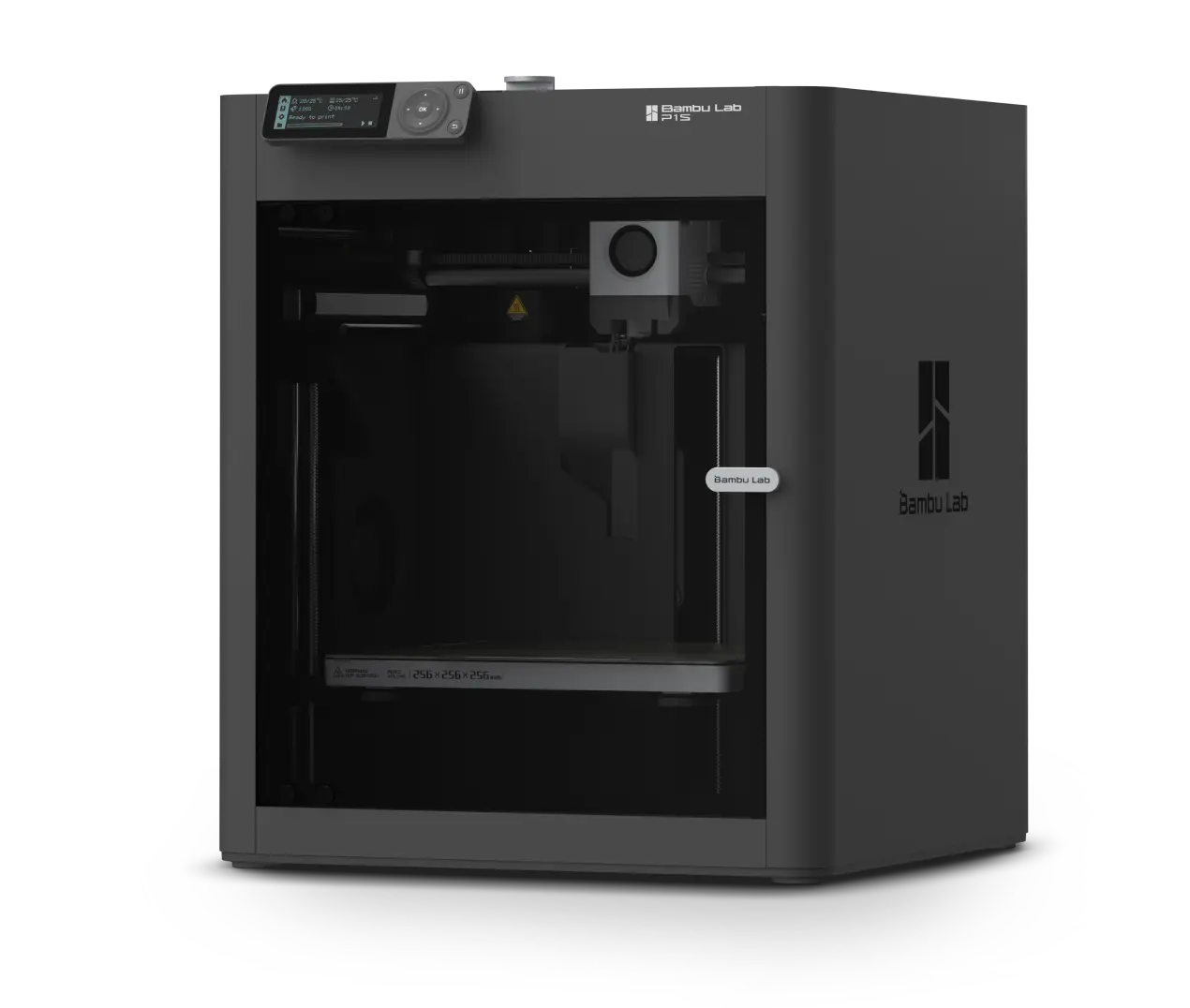
Spend less, print just as big.
- Camera
- 0.5 fps (choppy)
- Screen
- 2.7-in, buttons
- Nozzle
- Stainless steel
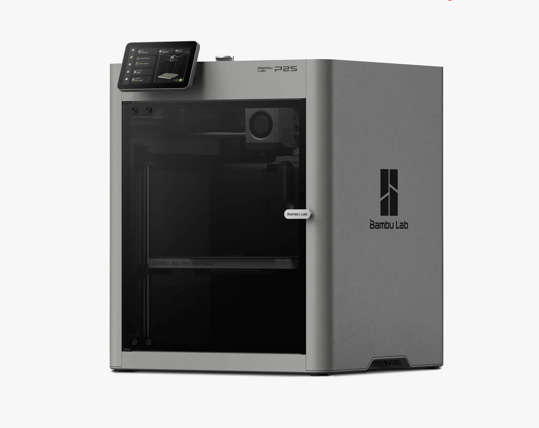
Smoother, less fiddly printing.
- Camera
- 30 fps (smooth)
- Screen
- 5-in touchscreen
- Nozzle
- Hardened steel
Updated November 17, 2026 · Research-based comparison, not a hands-on side-by-side test. Our research method.
P1S vs P2S at a glance
Here’s what changes between the two, from price and camera to the kinds of plastic each one handles comfortably. First, a little vocabulary. Filament is the plastic thread that comes wound on a spool. Bambu’s AMS is an add-on box that feeds filament into the printer for you, and it’s also how you print in several colors. Prices are US sale prices, before tax and shipping.
Prices (US, last checked)
| What you’re comparing | P1S | P2S | What it means for you |
|---|---|---|---|
| Printer alone | $349Typical $399 | $449Typical $549 | You’ll pay $100 more for P2S. Double-check the total in your cart.78 |
| Combo (with AMS 2 Pro)Both Combos add the AMS 2 Pro, which switches between four spools for multi-color prints. | $509Typical $579 | $649Typical $749 | Add AMS 2 Pro to both and the gap widens to $140. Watch out, though, because some cheaper P1S bundles come with the older AMS.78 |
Prices from Bambu’s US store on November 7, 2026, during its Black Friday sale. Tax and shipping not included. A $479 P1S bundle comes with the older AMS instead. Check the store before you buy.
Specifications
| What you’re comparing | P1S | P2S | What it means for you |
|---|---|---|---|
| Top printhead speed (advertised) | 500 mm/s | 600 mm/s | P2S can move faster, but how soon a print finishes also depends on the model and the plastic you use.12 |
| Hottest nozzle / bed | 300°C / 100°C | 300°C / 110°C | The P2S bed gets 10°C hotter. Neither printer has an actively heated chamber as standard.15 |
| Nozzle and feed gears in the box | Stainless-steel nozzle; steel drive gears | Hardened-steel nozzle and gears | P2S is ready for fiber-filled plastic out of the box. P1S needs a tougher nozzle and feed gears first.123 |
| Camera for keeping an eye on prints | 1280 × 720 / 0.5 fps | 1920 × 1080 / 30 fps | P2S gives you smooth live video. P1S shows a new picture roughly every two seconds, so it feels more like a slideshow.12 |
| Screen on the printer | 2.7-inch display with buttons | 5-inch touchscreen | If you like tweaking settings at the printer, you’ll enjoy the P2S touchscreen. If you do everything from your computer, the P1S buttons are fine.45 |
| Outside size | 389 × 389 × 458 mm | 392 × 406 × 478 mm | P2S is a little bigger. Leave room to open the door and lid and to load filament.12 |
| Automatic filament feeder | Optional; sold as a Combo with AMS 2 Pro | Optional; the P2S Combo includes AMS 2 Pro | “Combo” doesn’t always mean the same AMS, so check exactly which feeder is in the box.457 |
| Enclosure and air handling | Enclosed with carbon filter | Adaptive airflow plus filtration | Neither one replaces proper ventilation in the room you print in.159 |
Same on both (2)Biggest print size · Top acceleration (advertised)
We haven’t listed power use or noise because the published tests weren’t done the same way, so the numbers wouldn’t be a fair comparison.
Which printer will you enjoy more?
Try writing down the next ten things you want to print. If the list is mostly PLA boxes and organizers, the P1S is your starting point. The P2S starts to make sense when its camera, screen or hardened parts fix a problem you’ll run into often.
The P1S is enough if…
The P2S earns its extra cost if…
- You’ll use the 1080p/30 fps camera, the 5-inch touchscreen and the easier hotend swaps.526
- Carbon- or glass-filled filament is on your wish list and you want hardened parts fitted from day one.12
- It’s your first printer, the extra cost won’t hurt, and you want everyday printing to feel as easy as possible.57
Four differences you’ll notice
Spec lists are long. These are the four differences you’re most likely to notice once the printer is on your desk.
Watching prints is easier on P2S
The P1S camera refreshes about once every two seconds. That’s fine for a quick “is it still going?” glance, but frustrating if you want to watch a layer go down. The P2S streams 1080p video at 30 frames per second and adds a 5-inch touchscreen. Owners who moved over from P1S noticed both.15612
Fiber-filled filament is ready to go on P2S
Filament mixed with carbon or glass fibers works like fine sandpaper on the nozzle and the gears that push the plastic. P2S comes with hardened-steel versions of both. P1S can print suitable fiber-filled materials too, once you fit the right upgrades for that filament. If you’ll only use it now and then, price those parts before paying more for the newer printer.123
Faster on paper doesn’t always mean done sooner
Bambu lists P2S at 600 mm/s and P1S at 500 mm/s, with the same acceleration. In real use, though, one owner who switched saw longer time estimates on some jobs, and people are happy with the finish from both. The number that matters is how long your own files take at the quality you like.121013
Check which AMS is in the box
The printers alone are $100 apart; with AMS 2 Pro in both boxes, the gap is $140. A cheaper P1S Combo might come with the original AMS instead. If you want filament drying, look up exactly which AMS you’re getting and what drying it does before you choose a bundle.785
What eight owners ran into
Spec sheets tell you what’s in the box. These eight owners tell you what happened after they unpacked it, from sharper camera views to stubborn filament and surprise noise. Each story comes from one person’s setup, so read them as examples rather than rules.
This owner got nice-looking PETG parts from both printers. On one test piece, the P2S part looked better after they adjusted how much plastic flowed through the nozzle. Some of their P1S speed tests used upgraded parts, though, and the two printers sat on different anti-vibration feet. It’s a useful look at finish, but it can’t tell you which stock printer is faster.10
See the PETG finish comparisonAfter more than 2,000 hours on a P1S, this owner spent a week with a new P2S. They liked its PLA prints and camera, and felt it was quieter. Keep in mind they were comparing a brand-new machine with a well-used one.6
Read the first-week reportA forum member reprinted familiar designs on P2S with similar 0.4 mm nozzles, and the parts looked much like their P1S prints. What took getting used to was the slicer, the program that turns a 3D model into printer instructions, along with the new startup routine. This came from someone replying in the thread rather than the person who started it.14
Read the switcher’s replyThis switcher loaded familiar files into Bambu Studio and saw longer estimated print times on P2S. They also didn’t love the extra movements when loading and unloading filament. Those are software estimates, so new profiles or updates could change them.13
See the thread about slower estimatesAn owner with around 2,500 hours on P1S had filament-feeding and multicolor trouble on P2S. After more testing, they suspected the retraction settings (how the printer pulls filament back between moves) or the matte filament itself. A later multicolor print without the matte filament went fine, so the printer may not have been the whole story.15
Follow the problem and the updatesThis user enjoyed having the P2S nearby and found the touchscreen handier than expected. But some vibrations traveled farther through the house. Where you put the printer can change how loud it feels in other rooms.12
Read what they noticed at homeA small-business owner started with three P1S machines and later added P2S units, six printers in all. They liked the better cameras and easier maintenance, but found the finished prints broadly similar. When you buy several printers, even a small price difference multiplies. They didn’t share production or profit numbers.11
Hear from the six-printer ownerEricU printed a part in ABS, a plastic that likes to warp as it cools. On P2S, the corners lifted and nearby areas looked scorched. Similar parts had printed fine on P1S, so EricU moved just that one job back to the older printer. In the same thread, someone else fixed a different ABS print by preheating and changing the airflow.16
See what happened with the ABS partSo what do these stories add up to?
The camera and easier maintenance keep coming up as the P2S highlights. Print quality is more of a mixed bag, and filament settings or even the room can tip the result. These owners include people who run both printers, people who upgraded from P1S and one who moved an ABS job back. None of them says they replaced their P2S with a P1S. They show what can happen, though they can’t tell you how often.
Nine buying questions: P2S wins two, the rest are a draw
Each row below is one question buyers usually ask. Read across to see who comes out ahead and what that means for you. P1S doesn’t clearly win any of them, so the choice comes down to whether you’d use the P2S extras and whether they fit your budget.
| The question | Edge | What it means |
|---|---|---|
| Who is it for? | Even | Both are enclosed, mid-size desktop printers. What you plan to make matters more than the name on the front. |
| Hardware out of the box | P2S leads | With a clearer camera and hardened parts already fitted, P2S needs less fiddling for certain jobs. |
| Everyday hiccups | Even | Either one can clog, get a setting wrong or need recalibrating now and then. |
| Living with it long term | Even | P1S costs less to start; P2S saves you a few small steps. Both still need regular care. |
| Everyday projects | Even | Both handle normal hobby prints. P2S comes ready for abrasive filament, but it can’t print anything bigger. |
| What owners say | Even | Some owners love the P2S controls; others get nearly identical prints from both. |
| Problems and safety reports | P2S leads | P2S looks a little better on what’s been reported so far, but both have serious owner reports. Read the safety section before you buy. |
| Price and running costs | Even | P1S is cheaper to buy; whether a bundle is good value depends on which AMS comes with it. |
| Software and extras | Even | Both live inside Bambu’s software and accessory world, with similar trade-offs around firmware and third-party tools. |
These calls are our own judgment. They aren’t a vote by the owners quoted above. A tie means neither printer clearly wins that question, even if the hardware differs. Nobody publishes reliable safety-incident rates for each model.
What owning each one feels like
Spec sheets are great until you’re waiting on a five-hour print, wrestling a fussy filament or sharing a room with the machine. Here’s how each printer handles those moments.
Will the P2S get my five-hour print done sooner?
Maybe, but don’t plan your evening around its higher top speed. One owner saw longer estimates on some P2S jobs and noticed extra movements while filament loaded and unloaded. For a fair test, compare estimates with the same settings, or better still, time the same print on both.1213
Should I swap a working P1S for nicer PLA prints?
Not for that reason alone. One owner liked the finish from both printers; another preferred PLA from a brand-new P2S over their old, hard-working P1S. If your current printer already makes clean parts, the difference may be too small to justify a new machine.10614
Can I keep it in a room I share?
The P2S camera makes it easier to check on prints without hovering. One switcher also felt it was quieter up close, even though some vibration traveled through the house. A solid stand can help with that. Air quality is a separate job. Melting plastic indoors needs proper ventilation, especially with materials that give off more fumes.12917
Is the P2S easier to look after?
In one big way, yes. Swapping the hotend is quicker, and the printer has features that can flag some problems. Feeding and calibration hiccups can still happen. When something goes wrong, note the filament, your print settings and the firmware version (the software inside the printer). It makes finding the cause much easier.51518
What you’ll spend in total
A price tag only tells you something once you know what’s in the box. Before comparing, check whether you’re looking at the printer alone, a bundle with the original AMS, or one with AMS 2 Pro.
Start by comparing like with like
- In the Black Friday US sale, P1S was $349 (usually $399) and P2S was $449 (usually $549). Printer alone, that’s a $100 difference.78
- With AMS 2 Pro, P1S was $509 (usually $579) and P2S was $649 (usually $749), so they’re $140 apart. The $479 P1S Combo uses the older AMS, so don’t compare it directly.78
Then think about what you’ll use up
- Plain PLA almost never needs hardened parts. Carbon- or glass-filled filament is different: P2S already has the right hardened nozzle and gears, while P1S needs upgrades.123
- An AMS swaps filaments for you, but multicolor prints waste some plastic every time the printer flushes out the old color. Drying features and spool capacity depend on which AMS you buy, so check what’s in the bundle.519
- Set a little aside for spare parts, too. If you sell prints, even a short breakdown costs money. Look at the warranty and decide how much downtime you can live with.201521
Remember that these are US sale prices. Your checkout total will differ. Tax, shipping and regional pricing come on top, along with filament and upkeep.
Which one fits your kind of printing?
Find the row that sounds most like you. These six common situations should make the choice easier.
| If you’re… | Best fit | Here’s why |
|---|---|---|
| Learning on PLA or PETG with a tight budget | P1S | Same print size for less money. Spend the difference on filament while you practice.17 |
| Watching prints on video and tapping settings at the printer | P2S | Smooth live video and a proper touchscreen, though no extra build space.1212 |
| Printing carbon- or glass-filled filament often | P2S | The hardened nozzle and gears come fitted. The standard P1S needs upgrades first.123 |
| Running several printers on repeat jobs | Do the math | One six-printer owner liked the newer comforts but saw similar print quality. Multiply the extra cost by every printer you plan to buy.117 |
| Thinking of replacing a healthy P1S for nicer PLA | Keep the P1S | If your P1S is reliable, keep it unless a specific quality problem is holding you back.10146 |
| Printing in a bedroom, classroom or shared space | Ventilation first | Sort out how you’ll vent or control fumes before either printer goes into a shared room. The enclosure and carbon filter alone won’t solve air quality.917 |
Safety deserves a place in your decision
Having an enclosure doesn’t make a printer free of electrical, mechanical or air-quality risks. P2S came out slightly ahead on safety in the head-to-head above, but owners have reported serious incidents with both. What nobody knows yet is how common these problems are, or whether they still affect printers made today.
- Smoke on one P1S, a shattered door on another
- One P1S owner noticed smoke or a burning-electronics smell after a long print. Another said the glass door shattered and leftover fragments hurt a child. Neither cause was found. These are individual owner reports, and there has been no recall. Our P1S guide also covers two reports of an electrical fire or a burning component.2223
- Charred wiring and heat damage on P2S
- One P2S owner found charred wiring and melted protective material after printing ABS; they later said support offered a refund or replacement. Another saw damage to the silicone cover around the hotend and its heat-warning label. Neither cause was confirmed, and our P2S guide found no recall in its dated checks.2425
- So which one is more reliable?
- Honestly, nobody can say. There’s no measured failure rate for either printer, and no source compares incident rates across brands. One owner hit P2S trouble after about 2,500 hours on P1S, and another described several early P2S replacements. Let these stories nudge you to check support and safety information before you buy, without treating them as a forecast for your printer.1526
Full details: P1S safety section · P2S safety section.
What the research points to: P1S or P2S?
Most buyers land in one of these three camps.
Buying your first printer? The P2S is the better pick if you’ll use its clearer camera, touchscreen, quick-swap hotend or hardened parts. Just make sure the extra cost fits comfortably in your budget, because those features are what you’re paying for.51106
Mostly printing PLA and PETG? The P1S is the easy choice. You get the same 256 mm build volume for less. At the Black Friday sale prices, that leaves $100 for filament, or $140 if you’re comparing AMS 2 Pro bundles. Bambu has said it plans to keep selling and supporting P1S.715
Already own a P1S you like? Keep it until it stops doing what you need. Whichever you end up with, check the warranty, keep up with maintenance and give ventilation real attention.14112224
Six quick questions, answered
Can the P2S print bigger things?
No. Both max out at 256 × 256 × 256 mm. For something larger, split the model into parts or look at a printer with a bigger build volume.15
Does every Combo come with the same AMS?
No. P1S bundles have been sold with both the original AMS and AMS 2 Pro, while the named P2S Combo includes AMS 2 Pro. Check the box contents rather than trusting the bundle name.758
Can a P1S print carbon-fiber filament?
Yes, with upgrades. Bambu has a guide for fitting tougher extruder parts to the P1S; add the recommended wear parts and follow the filament’s printing instructions. The P2S comes with a hardened nozzle and gears from the start.312
Do I need an AMS if I only print in one color?
No. Both printers can feed a single spool from outside. An AMS handles filament automatically and makes multicolor prints possible, and its drying and feeding features depend on the model.1519
Will Bambu keep supporting the P1S?
Yes. Bambu said it would keep selling and supporting P1S after the P2S came out. Check the support terms where you live, too.5
Can I leave a print running alone because there’s a camera?
No. A camera helps you spot trouble, but it doesn’t replace keeping a sensible eye on things or following Bambu’s safety guidance. Use a stable surface and good ventilation, especially with filaments that give off more fumes.592224
Which has the better camera, the P1S or the P2S?
The P2S. It streams 1080p video at 30 frames per second, while the P1S camera shows a new picture about every two seconds.12
Does the P2S bed get hotter than the P1S bed?
Yes, by 10 °C: 110 °C against 100 °C. Neither printer has an actively heated chamber as standard.15
Is the P2S bigger on the outside than the P1S?
Slightly. The P2S measures 392 × 406 × 478 mm and the P1S 389 × 389 × 458 mm. Leave room to open the door and lid and to load filament.12
Can I vent the P2S outdoors?
Yes. Bambu sells an external exhaust fan kit for the P2S that can send air outside. Plan ventilation for the room with either printer.179
Where this information comes from
Specs come from Bambu’s own documents, prices from independent trackers, and the day-to-day details from owners in their own words. Each small number in the article links to the source behind it.
Our method
How we compared these printers
We built this from Bambu’s own specs, Bambu’s US store prices, independent reviews and owner reports. We did not test the two printers side by side. Prices come from the store listings cited in the prices table and leave out tax and shipping. Store links go straight to Bambu’s store, with no affiliate code and no commission.
- Bambu Lab P1S official quick start and specification table— Bambu LabP1S build volume, temperatures, rated speed, camera and size.
- P2S specification sheet (manufacturer sheet, retailer-hosted PDF)— Bambu Lab spec sheet via retailerThe maker’s P2S sheet: dimensions, speed ratings and supported materials.
- P1S Abrasive Filament Extruder Upgrade Guide | Bambu Lab Wiki— Bambu Lab WikiHow to fit Bambu’s abrasion-resistant extruder parts to a P1S.
- Buy Bambu Lab P1S: Your Best Budget 3D Printer with Enclosure and Filter | Bambu Lab US Store— Bambu Lab (official US store)P1S bundles and product details; we didn’t check a live checkout price here.
- The Icon Redefined: meet the P2S— Bambu LabP2S launch details and features, the 256 mm build volume, AMS 2 Pro, and Bambu’s statement on continuing P1S support.
- P1S user, thoughts on P2S after a week— Reddit r/BambuLabA longtime P1S user’s first week with a P2S: PLA finish, lighting and camera.
- Black Friday 2026 3D printer deals, tracked Nov 7, 2026— PrinterDrops (third-party price tracker)Snapshot of the November 7 US sale: $349/$449 for the printers and $509/$649 with AMS 2 Pro. These aren’t confirmed checkout totals.
- Bambu Lab Black Friday US current vs typical prices 2026— Gadgets3DP (independent price comparison)Prices from October 28, handy for seeing how the later sale compares.
- 3D Printer Safety— University of Illinois Division of Research SafetyPractical advice on ventilating a desktop 3D printer indoors.
- Comparing the P2S vs the P1S in Terms of Print Quality— Reddit r/BambuLabAn owner prints PETG on both machines, using modified P1S parts for some runs and different anti-vibration feet.
- P2S or P1S for print farming?— Bambu Lab Community ForumA six-printer owner on the newer P2S comforts and similar finished prints. No matched output or profit figures.
- My thoughts of the P2S after upgrading(?) from the P1S— Reddit r/BambuLabWhat one upgrader liked about P2S, and how its vibration carried through the house.
- P2S: Non-optimised time-consuming gcode?— Bambu Lab Community ForumA P1S-to-P2S switcher compares Bambu Studio time estimates on familiar files.
- P1S or P2S? (owner: heavy ASA use on P2S; filtration better than P1S)— Bambu Lab Community Forum (owner thread)The useful part is a reply from someone who owned both models; they also mention early software frustrations.
- LOVE my P1S combo, but I’m beginning to HATE my P2S combo!— Reddit r/BambuLabRead past the first post: later comments point to retraction settings and matte filament as possible causes.
- P2S ABS Issue — EricU returned an ABS job to P1S— Bambu Lab Community ForumEricU moved one tricky ABS job back to P1S; another member improved a different ABS print by changing their setup.
- P2S External Exhaust Fan Kit — installation guide (adds active exhaust; outdoor ducting; Purify-Air mode)— Bambu Lab Wiki (official)Bambu’s P2S exhaust options, including ways to vent air outdoors.
- Extruder Motor Overload Troubleshooting Guide for P2S— Bambu Lab WikiBambu’s steps for dealing with a P2S extruder motor overload.
- P2S FAQ— Bambu Lab Wiki (official)Bambu’s answers on P2S setup, compatibility and using an AMS.
- Warranty Statement (After-Sales Service Policy)— Bambu LabWarranty terms and regional differences worth checking before you order.
- P2S Maintenance and How To guides— Bambu Lab Wiki (official)Bambu’s instructions for servicing and maintaining the P2S.
- P1S smoke and melting-electronics smell owner report— r/BambuLab — firsthand postA first-hand report of smoke or a burning smell from a P1S; no confirmed cause.
- P1S front tempered-glass door safety incident— r/BambuLab — firsthand postA P1S owner describes shattered front glass and an injury; why it broke wasn’t clear.
- P2S owner report: PSU-area protection melted and wiring charred— r/BambuLab — firsthand postA P2S owner describes scorched wiring and melted protection, then an offer of a replacement or refund. Cause not confirmed.
- P2S owner: silicone sock and hot-warning sticker melted (forum post 22)— Bambu Lab Community Forum — owner replyA forum user’s report of damaged material near a P2S hotend and warning label; cause unclear.
- P2S owner with repeated replacements and hardware issues— r/BambuLabP2S — firsthand postOne P2S owner’s run of early hardware problems and several replacements.